How to Remove AI evangelists, 'Suggested' ads, and 'Promoted' posts from Linkedin

Are you sick of the cesspool of tech influencer nonsense and rampant advertising that Linkedin has become? Afraid your feed is clogged up with so many AI evangelists that you'll never see anything useful on Linkedin? Then fear no longer! Here is your answer.... as long as you're on desktop and using AdBlockPlus.... Hat tip and big thanks to this web page (https://identityunderground.wordpress.com/2018/10/29/note-to-self-blocking-promoted-feed-from-your-linkedin-page-with-adblock-plus-for-edge-firefox-chrome-not-ie/) for showing me how to block unwanted garbage on Linkedin. Go and give them an upvote! This technique specifically uses AdBlockPlus for Chrome. If you're using another browser or ad blocker, then the same principles will apply, but your mileage may vary. I also recommend setting up AdBlockPlus to only run on Linkedin, and use another ad blocker for everything except Linkedin, as I found AdBlockPlus slowed Chrome down to a crawl.
Download and install AdBlock Plus
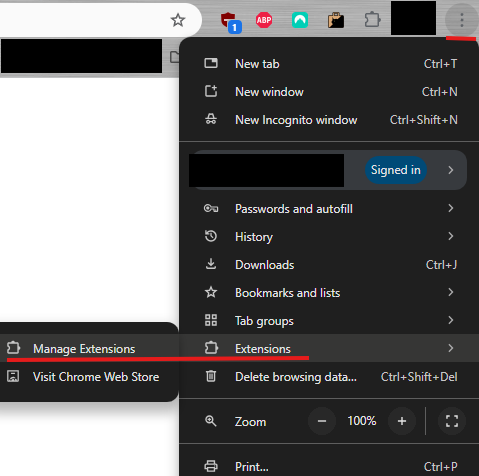
In your browser, click on the 3 vertical dots in the top right, and choose Extensions > Manage Extensions:
Go to Adblock Plus and click on 'Details':

Under 'Site Access'
- Set to 'On Specific Sites' (we don't want AdBlockPlus to run on other sites as it can slow down the browser)
-Click 'Add a new page'
-Add https://linkedin.com/* -Then click on and open 'Extension options'

Click on 'Advanced' and scroll down to 'My Filter List'. Add each of the following lines one-by-one (ie; paste one line then hit enter or click the +ADD button). If you paste these in but find the +ADD button is greyed out, it means you already have that exact line/filter entered. linkedin.com##.fie-impression-container:-abp-contains( AI)
linkedin.com#?#.feed-shared-update-v2:-abp-contains( AI)
linkedin.com#?#.feed-shared-update:-abp-contains( AI)
linkedin.com##.fie-impression-container:-abp-contains(Promoted)
linkedin.com#?#.feed-shared-update:-abp-contains(Promoted)
linkedin.com##.ad-banner
linkedin.com#?#.feed-shared-update-v2:-abp-contains(Promoted)
linkedin.com##iframe[src=”about:blank”]

That's it! You can adjust any of these filters keywords (such as " AI" or "Promoted") to whatever you like, and it should filter them out. One thing I have found, is that the longer a Linkedin tab is open, the slower it gets at removing posts before you see them. You will scroll down and see a Promoted post and it will disappear in front of your eyes after a few seconds. I just close the tab and reopen it to get the post removal happening quickly again.
Comments